
See what you play. Add what you’re missing.
Import your repertoire, sync with your games, and train what matters most.
Windows 10 or later • Free • No account required
Download and run ChessArbor.exe to start.
Current Version: 1.3.3 Newest Feature: Opponent Databases
Most opening trainers treat every line in your repertoire the same. ChessArbor flips that. Import your games from Chess.com, Lichess, or PGN files, and the app uses that data to tailor your training to how you actually play. You practice what you need, when you need it—and you stop wasting time on what you don't.
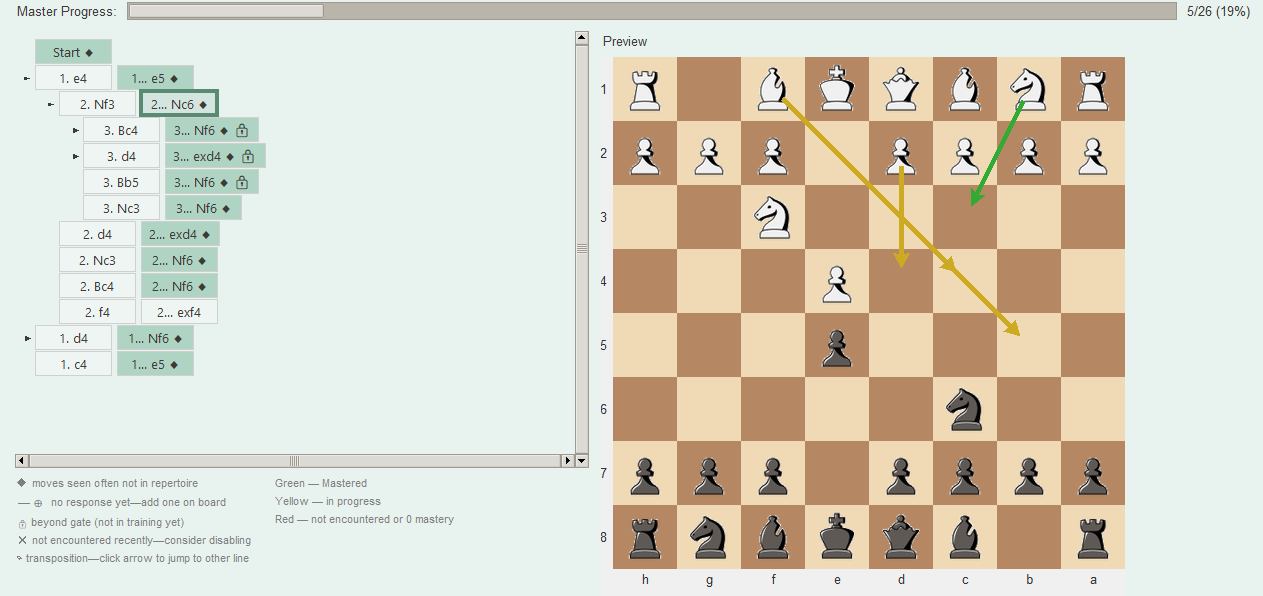
Expand where it matters ChessArbor analyzes every game you import and compares it to your repertoire. It finds the moves you play in real games that you haven't added yet—the gaps. In the Tree tab, these show up as Missing moves: positions where your opponents played something you've seen before, but you never prepared a response. No more guessing which sidelines to add; ChessArbor tells you exactly where to grow your repertoire based on what you actually face. You can add a missing move with one click in Edit mode. Training that matches your games The app weights your training by how often you reach each position in your imported games. Lines you see every blitz game come up more often in training; obscure sidelines come up less. You can choose Global (all games), Time control based (e.g. only blitz games when training for blitz), or Uniform if you prefer. Time control buckets—Bullet, Blitz, Rapid, Classical, Daily—let you train differently for each format. Training feels like the positions you encounter at the board, so your limited practice time goes to what matters most. Prune what you don't use ChessArbor tracks which positions you reach in your games. When a line in your repertoire is seldom or never encountered—based on your game history and a configurable threshold—the app flags it. In the Tree tab, these show up with a marker so you can see at a glance which lines are underused. You can disable those lines so they no longer appear in training, or keep them if you expect to face them soon. You stop wasting time on lines you don't play; your repertoire stays lean and focused. Spaced repetition for even practice ChessArbor uses spaced repetition (SM2) to schedule when each position appears. Positions you've mastered—correct moves in a row—come up less often. Positions you've gotten wrong or haven't seen recently come up more often. The system tracks your streak for each position and adjusts the schedule automatically. You get steady, even coverage across your repertoire instead of over-practicing some lines and neglecting others. You can also use per–time control streaks for separate mastery in bullet vs. rapid, or turn off spaced repetition and use cascade-only mode for a pure frequency walk based on your games. ChessArbor turns your game history into a smarter training plan. Import your games, build or import your repertoire, and start practicing what you actually play.